Arrow Business Presentation Template: A Modern Edge for Your Slides
Creating a presentation that truly resonates requires more than just good content; it needs a clear, professional, and visually engaging framework. This is where a well-designed template becomes invaluable. The Presentation Template - Arrow offers a solution built for clarity and impact. It’s not just a collection of slides; it’s a structured system designed to guide your audience through your narrative with a modern, directional flow.
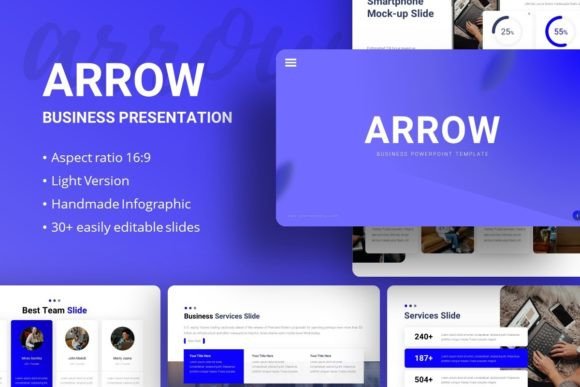
At its core, the Arrow template features a clean, contemporary aesthetic. Its visual personality is one of precision and forward momentum. You’ll find a balanced use of white space, crisp lines, and a restrained color palette that feels both professional and adaptable. The infographics and illustrations are handcrafted, meaning they have a cohesive, custom feel rather than looking like generic clip art. This attention to detail helps establish a professional and trustworthy brand perception from the first slide.
Where This Template Shines: Real-World Applications
The true strength of the Arrow template lies in its versatility. It’s built as a premium asset for professionals who need to communicate complex ideas simply. Consider these practical uses:
- For Startups and Pitch Decks: The structured layouts, including dedicated slides for timelines, team bios, and service breakdowns, help tell a compelling company story. The directional “arrow” motif subconsciously reinforces a message of growth and progress, which is perfect for investor presentations.
- Corporate and Business Reporting: Quarterly reviews, project proposals, and strategy sessions demand clarity. The template’s pixel-perfect charts and data visualization slides make numbers understandable at a glance, enhancing readability and visual hierarchy.
- Marketing and Creative Agencies: Use it to present campaign results, brand guidelines, or creative concepts. The clean canvas allows your own brand identity and work to take center stage without visual competition from the template itself.
- Personal Portfolios and Photography: The image placeholder system is a standout feature. You can drag and drop your photographs or design samples directly into pre-formatted spaces, creating a polished portfolio quickly. This is ideal for photographers, designers, or consultants.
Beyond the Slides: Practical Guidance for Use
Getting the most out of the Arrow Business Presentation Template involves a few key steps. First, always start with the Master Slides. This is the backbone of the file in PowerPoint. Editing colors, fonts, and logos here ensures consistency across all 35+ slides automatically, saving you hours of manual work.
When customizing, think about your content’s font pairing. The template uses Roboto, a highly legible sans serif font. For headings, you might pair it with a bold display font for extra impact, or keep it uniform with different weights of Roboto for a minimalist look. The key is maintaining a clear visual hierarchy so your audience knows where to look first.
Remember that the included images from Unsplash, Pixabay, and Pexels are for preview only. This is a standard practice for commercial templates. It’s a reminder to source your own high-quality, relevant imagery that truly represents your brand identity. The vector icons included, however, are yours to use and are fully resizable, making them perfect for social media graphics or infographics beyond the presentation.
Evaluating Fit and Final Thoughts
Is the Arrow template the right choice for your project? Evaluate it based on your need for modern typography and structured storytelling. It excels in scenarios where you need to present information in a logical, linear sequence—the “arrow” concept is more than just a visual; it’s a functional guide.
For small business owners, bloggers, or content creators, it offers a fast track to professional-looking materials without needing advanced design skills. The documentation file included is a critical resource; take the time to read it. It will explain how to edit the more complex elements and ensure you can leverage the full power of the design assets.
Ultimately, the Presentation Template - Arrow is a practical tool. It reduces the friction of starting from a blank canvas, provides a professional foundation, and gives you the flexibility to adapt it to your specific message. Whether you’re closing a sale, educating a team, or showcasing your portfolio, having a reliable and visually coherent framework like this can make the difference between a good presentation and a great one.