Business Point PowerPoint: A Guide to Polished Presentations
Crafting a presentation that holds attention is a common challenge. You need slides that look professional without requiring a design degree. The Business Point PowerPoint Presentation template is built for this exact purpose. It offers a structured yet flexible foundation for anyone from entrepreneurs to corporate teams. This isn't just a collection of slides; it's a toolkit for clear communication. The template prioritizes clean lines and a modern aesthetic, ensuring your message is the star. It’s designed to be both impressive for high-stakes meetings and adaptable for everyday business needs.
Understanding the Template's Core Design
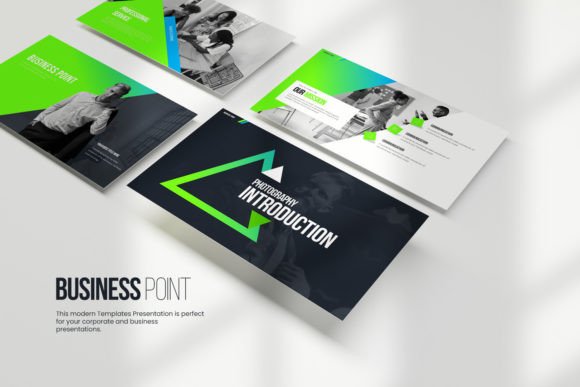
Business Point presents a visual personality that balances sophistication with clarity. Its style leans towards modern corporate design—think ample white space, structured layouts, and a restrained color palette. The default schemes on white backgrounds convey openness and professionalism, while the dark background options offer a more dramatic, contemporary feel. This duality makes it suitable for a wide range of corporate and business presentations. The overall appeal lies in its scalability; the same template can feel minimalist for a startup pitch or authoritative for a quarterly financial report. The design avoids unnecessary ornamentation, focusing instead on effective information hierarchy through strategic use of typography, icons, and placeholder charts.
The template includes 30 unique slide designs across 180 total slides, providing significant variety. Each element is fully editable, which is crucial for aligning with your specific brand identity. You can change colors, move objects, and adjust layouts to match your company's style guide. The inclusion of vector icons is a practical asset, allowing you to reinforce concepts visually without hunting for external graphics. For data-driven presentations, the charts are a standout feature. They are editable directly within Excel, meaning you can update your numbers without recreating the entire graphic in PowerPoint. This seamless integration saves time and reduces errors.
Practical Applications for Professionals
This template serves a broad audience. Entrepreneurs and small business owners will find it invaluable for creating investor decks, company overviews, and project proposals. The professional polish helps establish credibility from the first slide. Marketers and brand strategists can use it to present campaign strategies, performance reports, and brand guidelines. The clean layout ensures that key metrics and creative concepts are communicated without visual clutter. For content creators and bloggers, it’s an excellent tool for developing webinar slides, online course materials, or media kits that need to look sleek and organized.
The versatility extends to various project types. It’s perfect for internal team meetings where clarity is paramount, as well as for external client-facing presentations where first impressions matter. The template’s structure supports a logical flow of information, guiding your audience through your narrative. You can use the image placeholders to incorporate team photos, product shots, or relevant imagery, making your presentation more engaging. The consistent design language across all slides ensures that your final output feels cohesive and professionally curated, which strengthens your overall brand perception.
Making the Most of Your Template
When you first open the Business Point PowerPoint Presentation, take time to explore the slide master. This is where the core styles for headings, body text, and colors are defined. Editing here ensures consistency across your entire deck. Before you start adding content, install the recommended fonts as noted in the documentation file. Using the intended typefaces is key to maintaining the template’s designed hierarchy and readability. The fonts are selected to complement the modern, clean aesthetic—often pairing a clean sans serif for body text with a more distinctive display font for titles.
For effective use, start by outlining your presentation’s story. Then, choose the slides that best fit each section of your narrative. Don’t feel compelled to use every available slide; select the ones that serve your content. Leverage the built-in chart styles for any data visualization. Simply replace the placeholder data with your own in the linked Excel sheet to see your numbers take shape instantly. Use the vector icons to highlight key points, processes, or features, adding a layer of visual interest without resorting to distracting stock photos. Remember, the goal is to enhance your message, not overwhelm it.
Finally, always conduct a final review. Check for consistency in font sizes, color usage, and alignment. Ensure all placeholder text has been replaced and that your charts reflect the correct data. Because the template uses a 16:9 aspect ratio, it’s optimized for modern screens and projectors, giving you a wide canvas for your content. If you encounter any issues or have specific customization questions, reaching out for support is a recommended step. By following these practical steps, you can transform this versatile template into a powerful tool for communication, helping you present your ideas with confidence and clarity.