Kamila - Google Slides Template: A Guide to Elegant Branding
In the fast-paced world of digital marketing and corporate communication, the gap between a good idea and a great presentation often comes down to design. We have all been there—staring at a blank slide deck with a looming deadline, trying to align text boxes that just won't stick. This is where the Kamila - Google Slides Template enters the conversation. It is not just a collection of slides; it is a structured environment designed to elevate your visual storytelling. Whether you are a seasoned graphic designer pitching to a client or a small business owner updating your team, Kamila offers a blend of aesthetic appeal and functional utility that simplifies the creative process.
Understanding the Visual Identity
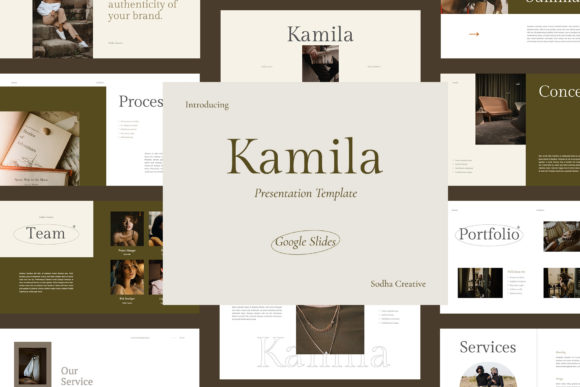
First impressions are rarely verbal; they are visual. The Kamila template is built on a foundation of modern typography and clean layouts. When you open the file, you immediately notice the 16:9 aspect ratio optimized for Full HD displays (1920x1080 pixels). This high-resolution canvas ensures that your images appear crisp and your text remains legible, whether you are projecting onto a large conference screen or sharing a window on a laptop.
The "personality" of Kamila is best described as professional yet approachable. It avoids the cold, sterile look of outdated corporate templates while steering clear of overly playful designs that might undermine authority. It strikes a balance that works for brand identity presentations, marketing reports, and creative portfolios alike. The layout utilizes a strict grid system, which is a lifesaver for maintaining visual hierarchy. When elements are aligned to a grid, the human eye processes the information faster, allowing your audience to focus on the content rather than the clutter.
Practical Applications Across Industries
The versatility of the Kamila - Google Slides Template makes it a valuable design asset for a wide range of users. For entrepreneurs and marketers, the template serves as a rapid deployment tool for pitch decks. Instead of spending hours building master slides from scratch, you can focus on refining your value proposition. The included mockups are particularly useful here; they allow you to drop in screenshots of your product or app without worrying about perspective or shadow effects, instantly making your presentation look more polished.
For content creators and bloggers, Kamila can function as a style guide holder. You can use the slides to map out your editorial calendar, showcase brand partnerships, or even create media kits. The creative design elements ensure that even text-heavy slides remain engaging. If you are involved in packaging design or physical product development, the template’s clean background allows your product photography to take center stage. It acts as a neutral frame that enhances rather than competes with your visuals.
Customization and Workflow Efficiency
One of the standout features of this template is its adherence to professional workflow standards. It is based on Master Slides, which means you can make global changes to fonts, colors, and logos in seconds. This is crucial for maintaining consistency across long decks. If your brand guidelines change halfway through a project, you do not need to edit 50 individual slides; you simply update the master.
The promise of being "fully editable" is often overstated in template marketplaces, but Kamila delivers on this front. You have complete control over every element. However, this flexibility requires a degree of discipline. I recommend utilizing the grid and guides provided. Resist the urge to break the grid unless you have a specific artistic intent. The structure provided by the template is there to ensure readability and flow. Furthermore, the use of free fonts (with links included) removes the friction of licensing issues, allowing you to get started immediately without hunting for assets.
Strategic Design Considerations
While the template provides the skeleton, the success of your presentation relies on how you flesh it out. Visual hierarchy is key. Use the larger slide layouts for your "big idea" moments and the more detailed grid layouts for data and specifications. This variation in pacing keeps the audience engaged. When selecting imagery to pair with the Kamila template, look for photos that match its clean, airy aesthetic. High-quality stock photography or original content with good lighting works best.
Consider the psychology of color as well. The template likely uses a specific color palette that you should adapt to your own brand identity. Consistency in color usage reinforces recognition. Do not underestimate the power of whitespace—a core component of Kamila’s design. Whitespace (or negative space) is not empty space; it is a powerful design element that gives the viewer’s eyes a place to rest and highlights the importance of the surrounding content.
Final Thoughts on Implementation
Ultimately, the Kamila - Google Slides Template is a tool to enhance your productivity and visual impact. It bridges the gap between amateur slideshows and professional editorial design. By leveraging its high-res capabilities and structured layouts, you can create presentations that look like they were outsourced to a high-end agency. Whether you are using it for internal strategy sessions or external client-facing pitches, the focus should remain on clear communication. Let the design support your message, not overshadow it. With Kamila, you have a solid foundation to build upon, ensuring your next presentation is not just seen, but remembered.