Why CoolKas GoogleSlide Templates Are a Game-Changer for Modern Presentations
Let’s be honest: most presentation templates look like they were designed in a different decade. They feel rigid, corporate, and utterly forgettable. You spend hours tweaking them, only to end up with slides that feel generic and fail to capture your audience’s attention. CoolKas GoogleSlide Templates break that cycle entirely. This isn’t just another set of slides; it’s a flexible design system built for the way we actually communicate ideas today—visually, dynamically, and with a clear sense of style.
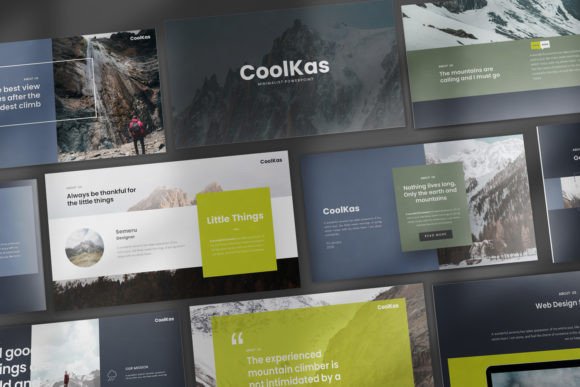
At its core, CoolKas GoogleSlide Templates is a collection of 60 unique slides (30 in two distinct color schemes) designed for Google Slides. The aesthetic walks a brilliant line between clean minimalism and creative flair. It’s not overly decorated, but it’s far from boring. Think of it as a modern typography playground: layouts are structured with clear visual hierarchy, but they leave ample room for your content to breathe. The included vector icons and fully editable charts mean you’re not just getting pretty frames—you’re getting functional design assets that actually help you present data and concepts clearly.
The Versatility Factor: From Boardroom to Creative Studio
One of the biggest strengths of this template set is its surprising range. The white and dark background versions alone make it adaptable to vastly different contexts. Need a polished, professional pitch for investors? The clean white version with its structured layouts conveys seriousness and clarity. Launching a creative brand or a new product line? The dark version offers a sleek, high-contrast backdrop that makes visuals pop and feels inherently modern.
This adaptability makes CoolKas GoogleSlide Templates a practical tool for a wide audience. Entrepreneurs and small business owners can use it to craft investor decks, sales proposals, or internal strategy meetings that look credible and polished. Marketers and content creators will find the layouts perfect for webinar slides, social media strategy presentations, or brand guideline documents. Even designers and bloggers can leverage its clean structure for project case studies, media kits, or workshop materials. It’s a true multipurpose tool because it provides a strong foundation without imposing a single, rigid style.
How Good Templates Shape Audience Perception
A presentation template does more than organize text and images; it actively shapes how your audience perceives your message and your brand. The visual consistency provided by CoolKas GoogleSlide Templates is key here. When every slide follows the same design language—consistent spacing, aligned elements, harmonious color—it creates a seamless experience. This consistency builds subconscious trust and professionalism. Your audience stops noticing the design (in a good way) and focuses entirely on your content.
The template’s use of modern typography and clean layouts directly influences readability and engagement. Text is given space, key points can be highlighted effectively, and visual flow guides the viewer’s eye from one idea to the next. This isn’t about flashy animations; it’s about intelligent structure. A well-designed slide with clear hierarchy, like those in this pack, helps prevent cognitive overload. Your audience can follow your narrative without struggling to decipher cluttered visuals or mismatched fonts.
Putting CoolKas to Work: Practical Tips for Your Next Project
Getting the most out of a template pack like this requires a bit of strategy. First, don’t use all 60 slides. Treat it as a library. Browse the variety of layouts—comparison slides, timeline graphics, team introductions, data-driven charts—and select the ones that truly serve your specific story. The goal is to create a cohesive deck, not to showcase every available option.
Second, make it yours. The templates are fully editable for a reason. Swap the placeholder text with your own voice. Change the color schemes to match your brand identity. Replace the placeholder images with your own high-quality photos or custom graphics. The included vector icons are particularly useful for adding subtle visual cues that reinforce your points. Because the base design is so clean, your customizations will integrate smoothly rather than looking tacked on.
Finally, leverage the practical features. The editable Excel charts are a huge time-saver for anyone presenting data. The 16:9 aspect ratio is the modern standard, ensuring your presentation looks great on any screen. And the included documentation and quick guide file mean you won’t waste time figuring out how things work. Before your big presentation, always run through the entire deck in presentation mode to check for flow, timing, and readability from the back of the room.
In a world saturated with mediocre slides, CoolKas GoogleSlide Templates offers a refreshing, practical solution. It provides the professional polish and creative flexibility needed to make your ideas stand out, whether you’re closing a deal, teaching a concept, or sharing your vision. It’s less about being a “premium font” in slide form and more about being a reliable design partner that elevates your communication.